May 12, 2008

IronRuby is coming! Expected to be released this year Microsoft's IronRuby is quite a unique project. Fully open sourced, OSI-approved/GPL-inspired  license, hosted at Rubyforge, accepting external contributions. Yes, Microsoft's IronRuby. Cool.

Anyway, I decided why don't I build IronRuby version of the famous "Try Ruby in your browser" by _why? So anybody with 15 free minutes at hands could play with IronRuby. That sounds like cool way to learn IronRuby internals.

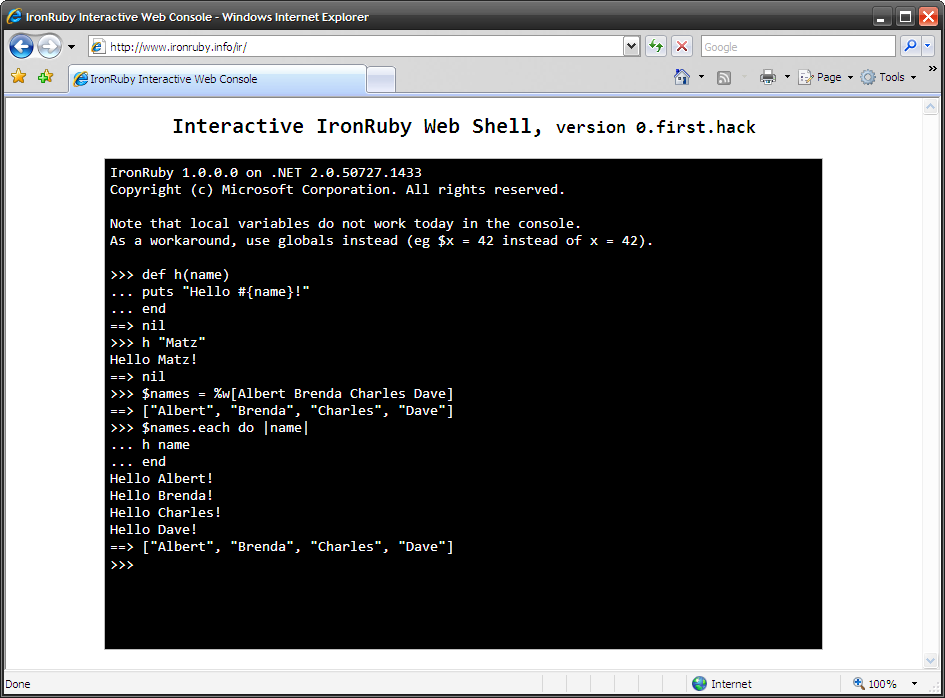
IronRuby includes ir.exe - nice interactive IronRuby shell. Thanks to open sources I managed to hack up simple AJAXish Web version in just one night. ASP.NET 3.5 application hosting IronRuby runtime + simple Web console emulating ir.exe.

It's hosted at http://www.ironruby.info/ir, currently at version "0.first.hack". Go play with it, but please don't crash it often. Here is a screenshot for those lazy ones:

Hosting a programming language shell on Web poses additional interesting problems. Ruby is a powerful language and IronRuby additionally provides access to the whole .NET framework. Letting anybody writing and executing any programs on my shared hosting??? Well, I managed to make it running under Minimal Trust level, which means execute permissions only. No file system, no network or Web access, nothing. That should be safe enough, but please don't hack me. Learn IronRuby instead!

Go Try IronRuby in your browser.

Any comments are welcome!

May 11, 2008

Here is a small quick release. IronXSLT v0.3.

New in this version:

May 3, 2008

A very little known fact is that Visual Studio 2008 does support real XSLT intellisense - not a static XSLT schema-based one, but real dynamic intellisense enabling autocompletion of template names, modes, parameter/variable names, attribute set names, namespace prefixes etc.

For some obscure reason it is off by default and obviously completely undocumented. I'll show you how to turn it on. But before - a little teaser.

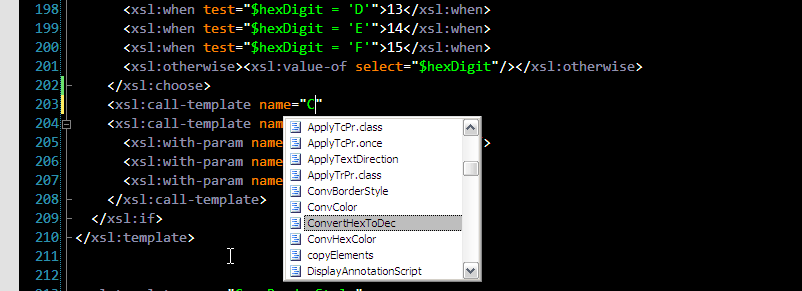
1. When you about to call a named template you are presented with a list of all named templates in your stylesheet. My favorite feature. Finally you don't have to remember all your template names:
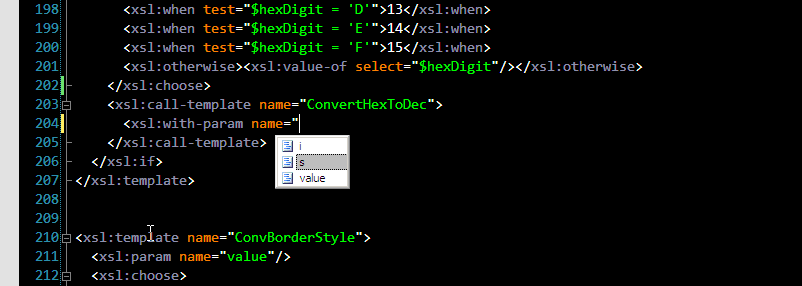
2. In XSLT template parameters are passed by name, so when you call a template and want to pass parameters you actually have to know exactly what parameter names are. And you better know them for sure, because if you make a mistake you pass a parameter with wrong name you get no error or even warning. XSLT 1.0 specification allows such nonsense.  That's why template parameter name autocompletion is a real time saver:
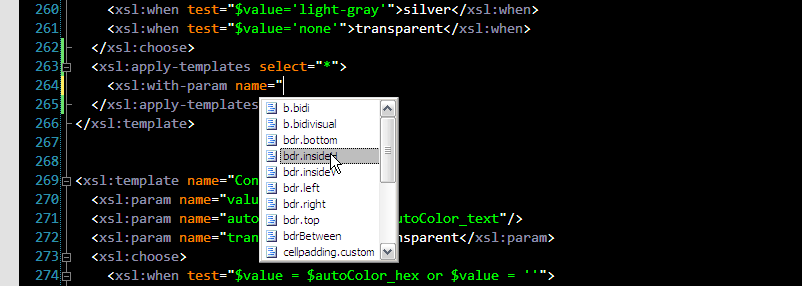
3.  You can pass parameters when applying templates too. Obviously due to dynamic XSLT processing model it's hard to know in advance which template will be matched at run time, so it's hard to suggest list of parameter names. In this version of XSLT intellisense we get list of all parameters used in all templates, filtered by mode. I believe XML Tools could optimize it a bit by filtering the list when it's clear from the context which template will be matched. Anyway, very useful:
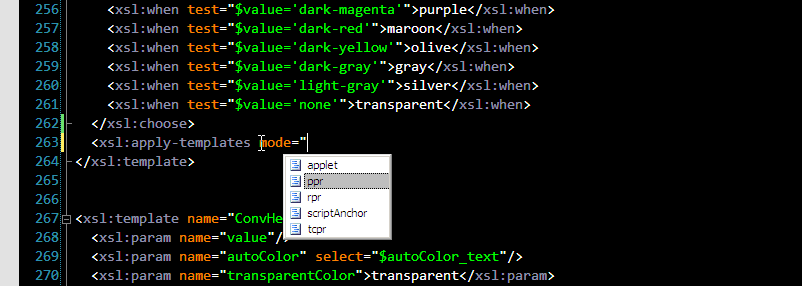
4. Autocompletion of template modes is also extremely useful. Make mistake in mode name and you can spend hours in debugger trying to figure out why your template isn't matched, because again this is not an error or even something wrong according to XSLT spec. That's why this is so cool:
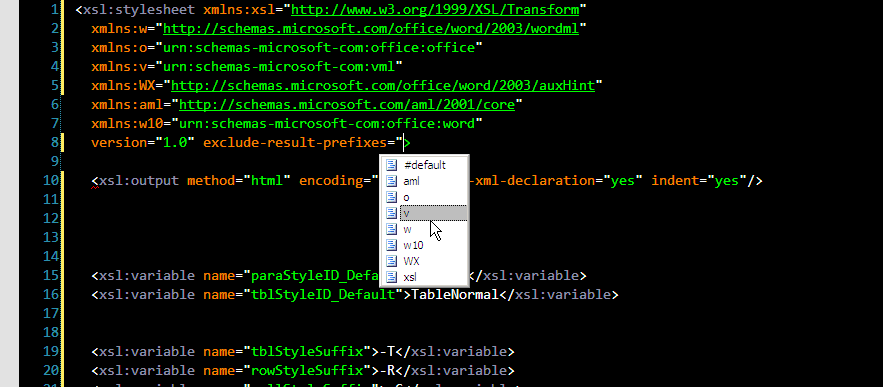
5. Finally a couple of useful namespace prefix autocompletions. exclude-result-prefixes now becomes easier:
and <xsl:namespace-alias> (mostly used for generating XSLT using XSLT):
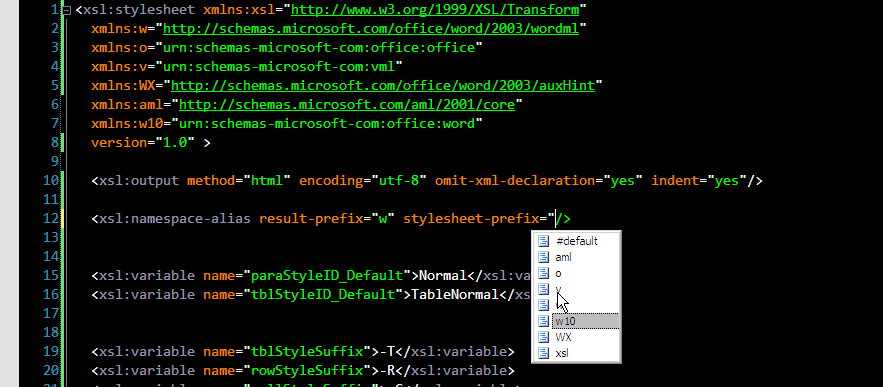
6. If you use <xsl:attribute-set> elements, you will be happy to see this one:
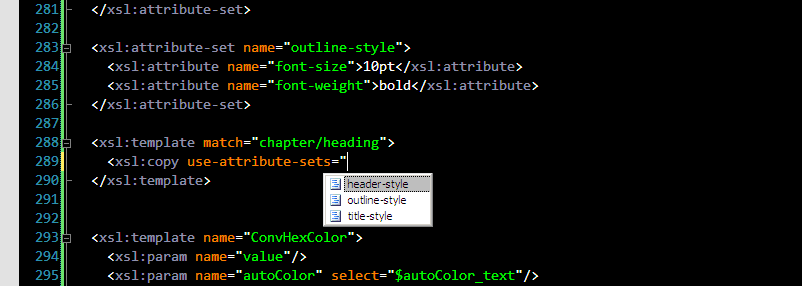
 

These are autocompletions I'm currently aware of. There might be more - it's currently completely undocumented and I probably the first one writing about this feature. For example key names are collected too, but I haven't found where they are used. If you happen to discover another XSLT autocompletion, report it in comments section please.

And finally how to turn this awesomeness on:

Yes, regedit. Create String value called "XsltIntellisense" under "HKEY_CURRENT_USER\Software\Microsoft\VisualStudio\9.0\XmlEditor" key. "True"/"False" are valid values.

If you are too lazy for editing registry manually, here is XsltIntellisense.reg file you can run (but rename it to .reg before).

If you don't want to mess with registry, wait till tomorrow. I'm going to release IronXSLT v0.3, which will turn XSLT intellisense on for you while installing.

Enjoy!

April 21, 2008

No, I don't own it. But with you help together we can win it.

blogs.asia domain name received more than one application (one of them was mine) during .asia landrush period and will be auctioned via dotasia.pool.com site soon (most likely in couple weeks). This will be a closed auction - only those who sent application during landrush period will be able to participate.

Now, I don't know how many people wanted this domain and how serious they are about bidding for this name. I was trying to register blogs.asia just for fun and probably will fail on the auction. So if anybody has any ideas about what blogs.asia can become and willing to spend some money on it, drop me a line and we can try to get it together.

April 17, 2008

In a challenging twist I happens to be living in Seattle area now (Redmond). And I'm looking for full time job. I got already one challenging offer, but you all know that one challenge is never enough. My resume for those interested to hire me.

April 16, 2008

I was doing some Web popularity research and found very cool data set collected by Philipp Lenssen back in 2006 and 2003. This is basically Google page count for 27000 English vocabulary words.

I decided to repeat the process on a wider word set via at least two search engines (Google and Live Search). So I combined Philipp's 27000+ vocabulary with Wiktionary (a wiki-based open content dictionary) English index and got quite comprehensive 74000+ vocabulary which reflects contemporary English language usage on the net. And then I collected page count number for each word reported by Google and Live Search.

And here are some visualizations. Unfortunately while Swivel can do do great interactive visualizations including clouds, they only support static graph for embedding. So don't hesitate to click on the graphs to see a better visualization (e.g. cloud for 100 top words).

Top 30 most popular words by Google, Live (numbers are in billions):
Most Popular Words (Google version)    Most Popular Words (Live version)

As expected, top is occupied by common English words and common internet related nouns.

Top 30 most popular words by Google vs Live:

 Most Popular Words (Google vs Live)

Top 30 gainers (Google, 2006 to 2008). Good to see x 48 page count gain for "twitter", the rest I cannot explain. Can you?

oracular x 163.6
planchette x 153.7
newsy x 93.5
posse x 81.7
nymphet x 75.2
jewelelry x 65.6
twitter x 48.6
paling x 48.2
waylain x 45.2
outmatch x 45.2
outrode x 41.6
pod x 41.0
phizog x 35.6
sinology x 29.9
overdrew x 26.7
multistorey x 26.5
nonstick x 25.6
nun x 25.4
pedicure x 24.8
pillory x 24.8
panty x 24.3
outridden x 24.0
nip x 23.2
naturism x 23.2
organddy x 23.0
piccolo x 22.0
paladin x 21.6
notability x 21.2
breadthways x 20.9

And finally top 10 the longest words along with page count (Google, 2008):

<w c="1460">tetaumatawhakatangihangakoauaotamateaurehaeaturipukapihimaungahoronukupokaiwhenuaakitanarahu</w>
<w c="5620">taumatawhakatangihangakoauauotamateaturipukakapikimaungahoronukupokaiwhenuakitanatahu</w>
<w c="60">methionylglutaminylarginyltyrosylglutamylserylleucylphenylalanylal...serine</w>
<w c="62300">llanfairpwllgwyngyllgogerychwyrndrobwllllantysiliogogogoch</w>
<w c="20100">taumatawhakatangihangakoauauotamateapokaiwhenuakitanatahu</w>
<w c="285">aequeosalinocalcalinosetaceoaluminosocupreovitriolic</w>
<w c="69000">pneumonoultramicroscopicsilicovolcanoconiosis</w>
<w c="1010">hepaticocholangiocholecystenterostomies</w>
<w c="18">hepaticocholangiocholecystenterostomy</w>
<w c="74500">hippopotomonstrosesquippedaliophobia</w>

Unsurprisingly, the longest  word is still 92 letters long name of a hill in New Zealand, this one is hard to beat.


The raw data sets (page count for 74000+ words) are available in XML format and also on Swivel (Google version, Live version) where you can play with them visualizing and comparing in your way. Any more interesting visualization or comparison for this data set can you came up with? Enjoy.

March 30, 2008

I was writing about a pilot the Library of Congress was doing with Flickr. I measured also number of tags, notes and comments and repeated the process several times during last 2 months. Here are some numeric results:

Library of Conress pilot on Flickr

As expected, while tags, notes and comments still coming, in general the lines are almost flat after 50 days.

Averages: 4.85 unique tags,  0.39 notes, 1.34 comments per photo.

The Library of Congress blog shared some real results:

And because we government-types love to talk about results, there are some tangible outcomes of the Flickr pilot to report: As of this writing, 68 of our bibliographic records have been modified thanks to this project and all of those awesome Flickr members.

Well, that doesn't impress much, but they must be happy as they have posted 50 more photos.

March 27, 2008

Here is another interesting problem: how do you generate HTML excerpts preserving HTML structure and style? Say you have long XHTML text:

<b>This is a <span style="color: #888">very long</span> text.</b>

In browser it looks like this:

This is a very long text.

The text is 25 characters long. Now you need to generate a short excerpt - cut it down to 15 characters, while preserving HTML structure and style:

<b>This is a <span style="color: #888">very ...</span></b>

So in a browser it would look like

This is a very ...

I solved it in XSLT 1.0 using ugly (but effifcient) recursive template:

<xsl:stylesheet version="1.0" xmlns:xsl="http://www.w3.org/1999/XSL/Transform">

  <xsl:param name="max-len" select="15"/>

  <xsl:template match="/">
    <xsl:call-template name="trim"/>
  </xsl:template>

  <xsl:template name="trim">
    <xsl:param name="rlen" select="0"/>
    <xsl:param name="nodes" select="*"/>

    <xsl:choose>
      <xsl:when test="$rlen + string-length($nodes[1]) <= $max-len">
        <xsl:copy-of select="$nodes[1]"/>
        <xsl:if test="$nodes[2]">
          <xsl:call-template name="trim">
            <xsl:with-param name="rlen" select="$rlen + string-length($nodes[1]) "/>
            <xsl:with-param name="nodes" select="$nodes[position() != 1]|$nodes[1]/*"/>
          </xsl:call-template>
        </xsl:if>
      </xsl:when>
      <xsl:when test="$nodes[1]/self::text()">
        <xsl:value-of select="substring($nodes[1], 1, $max-len - $rlen)"/>
        <xsl:text>...</xsl:text>
      </xsl:when>
      <xsl:otherwise>
        <xsl:if test="$nodes[1]/node()">
          <xsl:element name="{name($nodes[1])}" 
                       namespace="{namespace-uri($nodes[1])}">
            <xsl:copy-of select="$nodes[1]/@*"/>
            <xsl:call-template name="trim">
              <xsl:with-param name="rlen" select="$rlen"/>
              <xsl:with-param name="nodes" select="$nodes[1]/node()"/>
            </xsl:call-template>
          </xsl:element>
        </xsl:if>
      </xsl:otherwise>
    </xsl:choose>
  </xsl:template>
</xsl:stylesheet>

But I'm not happy with this solution. There must be more elegant way. The problem just smells FXSL. Hopefully Dimitre can show me how FXSL can do it with beauty and style.

I also wonder how would you do it with XLinq?

March 21, 2008

We are working on yet another language migration tool and faced once again Java source code generation problem. Unfortunately Java doesn't have anything similar to .NET's CodeDOM, so we had to build own own Java generator. This time our development platform is XSLT 2.0. Yes, we are converting COOL:Gen (obscure 4GL model-based language) to Java using XSLT 2.0.

XSLT 2.0 rocks by the way. This is first time I write production code in XSLT 2.0 and this is amazing experience. Suddenly all is so easy, everything is possible, no hassle. Despite poor authoring support (Eclipse XSLT editor sucks, while Visual Studio 2008 with XSLT 2.0 schema is ok, but cannot run Saxon), lack of debugger and Saxon quirks I had a blast practicing XSLT 2.0 for real.

At first I started generating Java beans simple way: output mode="text" and producing Java sources as text. Obviously it sucked big way. I spent a week and got it done, but with way too cumbersome and fragile code. Generating code and simultaneously coping with Java syntax and formatting is hard. Additional layer of indirection was needed desperately.

One of smart guys I work with came with a simple but brilliant idea. Vladimir took Java 6 ANTLR grammar and converted it to XML Schema. Then he developed a generic serializer (also in XSLT 2.0 of course) that is able to convert XML document confirming to Java XML schema (he called it JXOM -  Java XML Object Model) into nicely formatted and optimized decent Java 6 source code.

Then I rebuilt my Java bean generator using JXOM instead in just one day. Building Java as XML is so much easier and cleaner, I believe it's even easier than using System.CodeDom in .NET (obviously CodeDom can do more than just generate C# or VB sources).

Anyway, anybody interested in Java generation - check out JXOM. This is really easy way to generate Java 9even Java 6.0) using XSLT. It's freely available and it just works. Here are more links:

  1. Java xml object model
  2. Xslt for the jxom (Java xml object model)
  3. jxom update

JXOM is ready to use, but still under active development. Any feedback is highly appreciated at Vladimir and Arthur Nesterovsky blog.

March 6, 2008

Sergey Dubinets, the guy behind Microsoft XSLT engine and tools is blogging. Subscribed. Highly recommended.

More XSLT bloggers from Microsoft:

February 20, 2008

Inspired by ioccc.org, just for fun, really. Can you figure out what this stylesheet outputs (without running it of course)?

<!DOCTYPE p [
<!ENTITY _0_ 'string'>  
<!ENTITY _0-0_ 'sub&_0_;'>
]>
<p x:version="1.0" xmlns:x="http://www.w3.org/1999/XSL/Transform">
  <x:variable name="_" select="document('')"/>
  <x:variable name="_-_" select="number(not(_-_=_-_=_-_=_-_))"/>
  <x:value-of select="concat(
    &_0-0_;(namespace-uri($_/*/*[$_-_]), $_-_, $_-_), 
    &_0-0_;(name($_/*/*[$_-_]), &_0_;-length(*>*)*2, $_-_),
    &_0-0_;(@_>_-, &_0_;-length(******* div @_), $_-_),
    translate(name(($_//@*)[5]), translate(name(($_//@*)[5]), 'l', ''), ''),
    &_0-0_;($_//namespace::*, &_0_;-length($_-_ div 0)+7, $_-_), '&#032;',
    &_0-0_;-after(&_0-0_;-before($_//namespace::*, 3), '.'),
    &_0-0_;($_//namespace::*, 15, 2),
    &_0-0_;(_/_/_=//_//_, 3, $_-_),
    &_0-0_;($_/*/*/@*[contains(.,'(')], $_-_, $_-_), '&#x21;')"/>
</p>

By the way, does anybody think XSLT obfuscator is a useful tool?

February 11, 2008

Microsoft XML Tools team has released XSLT profiler addin for Visual Studio 2008. I've heard about this tool and even did a little testing long time ago (apparently it's very hard to release anything in Microsoft).

First thing you need to know about Microsoft XSLT profiler - it requires Visual Studio 2008 Team System edition with the Performance Tools feature installed. That actually sounds a bit steep for just XSLT profiler, but it starts to make sense once you realize this tool is just a thin wrapper around the F1 profiler (which only ships with Visual Studio Team System SKU).

Once installed, it adds "Profile XSLT" command (visible only in XSLT context, i.e. when active document is XSLT stylesheet) to the XML menu:

Before you see profiling results you should recall that XSLT in .NET starting with 2.0 is compiled to MSIL:

As you can see, an XSLT stylesheet is being compiled into a class and each template becomes a method with cool special name like <xsl:template match="book">. That was smart. And yes, MSIL is completely ok with such kind of method names. Beside template-mehods the generated class contains other auxiliary stuff. So don't be surprised with XSLT profiling results:

I'd say there is too much clutter in this form. I'd like to see only XSLT relevant info, but as you can understand now, it's the the results of profiling compiled assembly and XSLT part is here only because smart compilation tricks.

Still extremely useful tool. A must for anybody writing XSLT in Visual Studio. Besides Summary View there are: Call Tree View, Modules View, Caller/Callee, Functions, Marks and Processes Views. You can find more info about profiling report details at http://code.msdn.microsoft.com/xsltprofiler.

I'd be happy to see next version. With all clutter removed, more XSLT focused, linked to XSLT source (seems like currently there is no way to get back to template source from report), may be with some smart visualizations (what about coloring XSLT source view to indicate the hot spots?). Oh well, provided it took XML Tools team so long to ship this tool I better try to implement all these ideas myself in Iron XSLT (stay tuned, it's not dead as I'm back).

February 8, 2008

When you create new XSLT stylesheet in Visual Studio via project (Add/New Item) or globally (File/New/File aka Ctrl+N), you start with template content. This template is changing in every new Visual Studio version, probably because every new generation of developers working on XSLT tools in Visual Studio have different vision about what you should start with.

Let's see. Visual Studio 2003. Pure simplicity:

<?xml version="1.0" encoding="UTF-8" ?>
<stylesheet version="1.0" xmlns="http://www.w3.org/1999/XSL/Transform">
</stylesheet>

Visual Studio 2005 has two different templates for new XSLT stylesheet (!). When you create it via project you get the same as above empty stylesheet template. But if you go via Ctrl+N you get this fancy template:

<?xml version="1.0" encoding="utf-8"?>

<xsl:stylesheet version="1.0"
    xmlns:xsl="http://www.w3.org/1999/XSL/Transform"
    xmlns:exsl="http://exslt.org/common" 
    exclude-result-prefixes="exsl">

<xsl:template match="/">
    <html>
    <body>
    <!--
        This is an XSLT template file. Fill in this area with the
        XSL elements which will transform your XML to XHTML.
    -->
    </body>
    </html>
</xsl:template>

</xsl:stylesheet>

Yes, believe it or not, but some Microsoft developers were sure you should start with EXSLT namespace declaration in your stylesheet. The fact is that .NET 2.0 introduced partial native support for EXSLT, but it was never documented. It's still hidden portability gem.

Now what you get in Visual Studio 2008:

<?xml version="1.0" encoding="utf-8"?>
<xsl:stylesheet version="1.0" xmlns:xsl="http://www.w3.org/1999/XSL/Transform"
    xmlns:msxsl="urn:schemas-microsoft-com:xslt" exclude-result-prefixes="msxsl"
>
    <xsl:output method="xml" indent="yes"/>

    <xsl:template match="@* | node()">
        <xsl:copy>
            <xsl:apply-templates select="@* | node()"/>
        </xsl:copy>
    </xsl:template>
</xsl:stylesheet>

No more EXSLT, back to basics - proprietary nonportable MSXSL namespace by default. This is sad.

Beside this weird proprietary comeback it's interesting that this new template contains identity transformation rule. This cumbersome looking <xsl:template> is the base of data transformation filtering. It processes every single node in source document recursively and outputs it as is.  By adding more template rules you can override base behavior to add, remove or modify particular nodes. Very powerful technique. This is smart choice for new file template.

January 28, 2008

State of the art of XSLT testing in a simple succinct format by Tony Graham.

Creating a working stylesheet may seem like an end in itself, but once it’s written you may want it to run faster or you may not be sure that the output is correct (And if you are sure, how sure are you?).

Profilers, unit test frameworks, and other tools of conventional programming are similarly available for XSLT but are not widely used. This presentation surveys the available tools for ensuring the quality of your XSLT.

January 27, 2008

On Dizengoff street, Tel-Aviv.


© Elena Tkachenko

The Library of Congress has launched an interesting pilot project with Flickr, which can be characterized as a crowdsourcing experiment.

They have uploaded 3115 copyright-free photos from two of the most popular collections and in return they hope the Flickr community will enhance the collections by labeling and commenting images:

We want people to tag, comment and make notes on the images, just like any other Flickr photo, which will benefit not only the community but also the collections themselves. For instance, many photos are missing key caption information such as where the photo was taken and who is pictured. If such information is collected via Flickr members, it can potentially enhance the quality of the bibliographic records for the images.

Crowdsourcing is a special case of a human-based computation, a technique for solving problems that computers just incapable of (or if you wish - problems for which humans cannot yet program computer to solve). The simple idea behind human-based computation is to outsource certain steps to humans. And if you outsource it to the crowd you get crowdsourcing:

Crowdsourcing is a neologism for the act of taking a task traditionally performed by an employee or contractor, and outsourcing it to an undefined, generally large group of people, in the form of an open call. For example, the public may be invited to develop a new technology, carry out a design task, refine an algorithm or help capture, systematize or analyze large amounts of data (see also citizen science).

  Think about tagging images (Google Image Labeler), answering arbitrary human questions (Yahoo! Answers), selecting the most interesting stories (Digg, reddit), inventing better algorithms (Netflix prize) or even monitoring the Texas-Mexican border.

Btw, did you know that Google didn't invented Google Image Labeler, but licensed Luis von Ahn's ESP Game? And that while the crowd is working for free on Google Image Labeler, improving Google's image search, Google never shares collected tags? I don't think that's fair. Moreover I think that's unfair. Results of crowdsourcing must be available to the crowd, right?

Anyway, how is the pilot going? From the Flickr blog we learn first results:

In the 24 hours after we launched, you added over 4,000 unique tags across the collection (about 19,000 tags were added in total, for example, “Rosie the Riveter” has been added to 10 different photos so far). You left just over 500 comments (most of which were remarkably informative and helpful), and the Library has made a ton of new friends (almost overwhelming the email account at the Library, thanks to all the “Someone has made you a contact” emails)!

That was after 24 hours. Today, 10 days later the results (according to my little script) are: 2440 comments, 570 notes, 13077 unique tags.

That's almost 500% more comments and 300% more tags. In average 0.8 comments and 4.2 tags per image. Not bad, but not very impressive too. I will be interesting to check it again in a month to see what's is the trend.

It's also interesting to see when bad guys start to abuse it. Google Image Labeler was abused less than a month after its launch. And Google Image Labeler is protected from abuse by using only tags selected by both players independently, while on Flickr there is no protection whatsoever.

I also figured out that while these 3115 photos were posted to Flickr, there are about 1 million others available online in the Library of Congress's own Prints & Photographs Online Catalog, which is really astounding. Check out this picture of General Allenby's entrance into Jerusalem back in 1917:

Scanned from b&w film copy negative, no known restrictions on publication, freely available as uncompressed tiff (1,725 kilobytes). Now that's real wow.

November 8, 2007

I noticed Robert Robbins was writing about XSS attacks using XSLT:

It is possible to extend the power of XSLT using JavaScript embedded into the XSL file. Therefore any web application that allows the user to upload their own XSL file will be vulnerable to Cross Site Scripting attacks.

Well, that's not exactly true, at least on Microsoft platform.

Microsoft tackled this issue long time ago. Both MSXML 6.0 and .NET (since 2.0) don't allow script extensions and document() function in XSLT by default. One has to enable them explicitly. So the truth is s bit different: any web application that allows the user to upload their own XSL file and explicitly allows executing embedded scripts will be vulnerable to Cross Site Scripting attacks.

While we at this, here is some refresher for this important to know topic:

MSXML 6.0 XS:T Security:

Denial of Service Attacks

Untrusted style sheets are those that come from an untrustworthy domain. There is no way to eliminate denial of service (DoS) attacks when processing untrusted style sheets or untrusted documents without removing necessary functionality. If denial of service is a concern, do not accept untrusted style sheets or untrusted documents for transformation.

Cross-Site Attacks

It is not safe to compile and execute an untrusted style sheet within a trusted page (such as a page from your local hard drive). The style sheet may contain the document() function or xsl:include / xsl:import statements, which are capable of loading trusted files and sending them back to the untrusted domain.

XSLT Scripts Are Prohibited by Default

The DOM supports XSLT transformations via calls to the transformNode method and transformNodeToObject method. XSLT supports scripting inside style sheets using the <msxsl:script> element. This allows custom functions to be used in an XSLT transformation. In MSXML 6.0 this feature is disabled by default. If you require scripting in your XSLT transformations, you can enable the feature by setting the AllowXsltScript Property to true.

To allow XSLT scripting (JScript):

doc.setProperty("AllowXsltScript", true);

To disallow XSLT scripting:

doc.setProperty("AllowXsltScript", false);

Internet Explorer uses MSXML 3.0 by default, so when using the MIME viewer to transform scripts, Internet Explorer's security settings are used.

However, if you use MSXML 6.0 via script in Internet Explorer to execute transformations, when the AllowXsltScript property is set to false scripting is disabled no matter what Internet Explorer's settings are. When AllowXsltScript is set to true, Internet Explorer's security settings are used for executing.

The XSLT document Function Is Disallowed by Default

The DOM supports XSLT transformations via calls to the transformNode and transformNodeToObject methods. The XSLT document function provides a way to retrieve other XML resources from within the XSLT style sheet beyond the initial data provided by the input stream. In MSXML 6.0 this feature is disabled by default. If you must use the document function in your XSLT transformations, you can enable the feature by setting the AllowDocumentFunction property to true.

The following is the JScript code to allow the document function:

doc.setProperty("AllowDocumentFunction", true);

To disallow the document function:

doc.setProperty("AllowDocumentFunction", false);

If you enable the document function, you should be aware that the document function runs with the same security settings as the style sheet. If your style sheet is running in a trusted security context, then all files loaded using the document function will run in the same security context. For example, if scripts are allowed in the main style sheet, they will be allowed in all the included and imported files. You should not load untrusted documents via the document function.

Loading External Files Is Prohibited by Default

External files loaded via xsl:include or xsl:import are allowed and processed by default in MSXML 4.0 and 5.0 for backward compatibility. In MSXML 6.0, external files are not processed by default – they must be explicitly enabled by the developer.

If you are using MSXML 6.0 and all of your XSLT style sheets and XML documents come from a secure site, you can allow external schemas by setting the resolveExternals property to true. If you are using MSXML 4.0 or 5.0 and your XSLT style sheets and XML documents do not come from a secure site, you can operate in a safer mode by setting resolveExternals to false.

To allow external files:

doc.resolveExternals = true;

To disallow external files:

doc.resolveExternals = false;

XslCompiledTransform Security:

The XslCompiledTransform class supports the xsl:import or xsl:include elements by default. The XslCompiledTransform class disables support for the document() function by default. The XsltSettings class is used to enable the document() function.

The Load and Transform methods include overloads that take an XmlResolver object as one of its arguments. If an XmlResolver is not specified, a default XmlUrlResolver with no credentials is used.

You can control how external resources are accessed by doing one of the following:

  • Restrict the resources that the XSLT process can access by using an XmlSecureResolver object.

  • Do not allow the XSLT process open any external resources by passing in null to the XmlResolver argument.

Script Blocks

The XslCompiledTransform class does not support script blocks by default. Script blocks are enabled using the XsltSettings class. XSLT scripting should be enabled only if you require script support and you are working in a fully trusted environment.

Extension Objects

Extension objects add programming capabilities to XSLT transformations. This feature is enabled by default. If extension objects are passed to the Transform method, they are used in the XSLT transformation.

October 30, 2007

Better later than never. I uploaded IronXSLT 0.2 release.

New in this version:

  • IronXSLT should now run without Visual Studio 2008 SDK
  • A notion of a Startup stylesheet in XSLT Library project
  • "Debug" page in XSLT Library project properties, which has Startup stylesheet dropdown list
  • "Set as StartUp Stylesheet" context menu item for XSLT stylesheets
  • "Start Debugging(F5)/Start Without Debugging(Ctrl+F5)" commands support - runs startup stylesheet

My goal was to make F5/Ctrl+F5 working intuitively right - when you work on XSLT Library project F5 should run project with debugger and Ctrl+F5 - without. When you have more that one stylesheet it's nice time saving feature, not to mention that start debugging command finally starts debugger as it should.

But what to run? So I introduced a notion of a startup XSLT stylesheet in a project. It's kinda like startup object in C# projects, but currently only affects debugging within Visual Studio. You mark your startup stylesheet either via project properties (Debug tab):

 or via new context menu item I added to XSLT stylesheets:

Once you have startup stylesheet in XSLT Library project you can start it as you usually start project with or without debugging:

I also spent unbelievable amount of time trying to make startup stylesheet bolded in Solution Explorer. It still doesn't work on project load...

Anyway, get IronXSLT 0.2 at http://www.xmllab.net/downloads. It's free. Give it a try with Visual Studio 2008 Beta2. Find more documentation at http://xmllab.net/ironxslt.

October 7, 2007

This book looks like one of the best Ruby on Rails book I've seen so far. It's probably more an introductionary one, but seems pretty solid. Hey Amazon marks it as [ILLUSTRATED] book :)

Anyway if Sitepoint lets you download it for free, why not. And if you prefer dead-tree copy, get $10 discount. The giveaway expires in 54 days.

Btw, don't you think Patrick Lenz should change his photo on this page? Come on Patrick, Ruby is all about fun.

[Via .Avery Blog]

August 24, 2007

Here goes nxslt3.exe/NxsltTask v3.0. It's nxslt tool for .Net 3.5. It can do everything nxslt2/NxsltTask v2.3 can plus the ability to run compiled XSLT stylesheets.

Now short documentation about running compiled XSLT stylesheets.

Let's say you have a stylesheet called mytransform.xsl. First you compile it using nxsltc:

nxsltc mytransform.xsl /out:mytransform.dll

The result is mytransform.dll, containing mytransform class.

Now you can run it. Here is a full form:

nxslt3 document.xml -c mytransform -af mytransform.dll

-c option says you want to run compiled stylesheet. Instead of XSLT stylesheet file name you pass compiled stylesheet class name (fully qualified if it has a namespace). And you need to specify dll file, where compiled stylesheet can be found.

Of course if you can afford assume things you can make it shorter. If dll is named after stylesheet and can be found in the current directory, you can omit it:

nxslt3 document.xml -c mytransform

Alternatively if dll contains single compiled stylesheet you can specify dll and omit stylesheet:

nxslt3 document.xml -c -af mytransform.dll

If you happens to compile your stylesheets into a strongly named dll:

nxsltc mytransform.xsl /keyfile:d:\keys\test.snk

and then installed it into the GAC, you run it by specifying full or partial dll name after -an option:

nxslt3 document.xml -c -an "mytransform, Version=1.0.0.0, PublicKeyToken=b79508ebff528747"

This works too (partial name):

nxslt3 document.xml -c -an mytransform

That's about it.

And finally. nxslt3 is a free feature-rich .NET 3.5 XSLT command line utility and NAnt/MSBuild task which uses .NET XSLT processor - XslCompiledTransform class and supports XML Base, XInclude, XPointer, EXSLT, compiled stylesheets, embedded stylesheets, processing instruction, multioutput, custom URI resolving, custom extension functions, pretty printing, XHTML output, XSLT 2.0-like character maps and more.

nxslt3.exe/NxsltTask are free tools under BSD license. Download here.