
Well, seems like images are one of the WordprocessingML trickiest parts, at least for me. Here are humble results of my investigations and experiments in embedding images into XSLT-generated WordprocessingML documents.
Images in WordprocessingML are represented by w:pict element, which holds both VML and binary data (obviously Base64 encoded). VML only or VML and binary . Even if you are embedding just plain binary gif, some VML elements still needed. So VML is your friend.
The "Overview of WordprocessingML" document only gives a couple of samples, saying that "A discussion of VML is outside the scope of this document". Great. Generally speaking VML is somewhat esoteric stuff for me. Here is why.
All we've seen funny import in office.xsd schema document:
<xsd:import namespace="urn:schemas-microsoft-com:vml"
schemaLocation="C:\SCHEMAS\vml.xsd"/>
Somebody at Microsoft does have vml.xsd in C:\SCHEMAS directory, but unfortunately they forgot to put it into "Microsoft Office 2003 XML Reference Schemas" archive. Then many elements in office.xsd have such annotation "For more information on this element, please refer to the VML Reference, located online in the Microsoft Developer Network (MSDN) Library." You can find VML reference at MSDN here. But it's dated November 9, 1999 so don't expect XSD schema there.
Some clarifications are expected, watch microsoft.public.office.xml newsgroup for details.
Anyway, when inserting raster image (GIF/JPEG/PNG/etc), Word 2003 creates the following structure:
<w:pict>
    <v:shapetype id="_x0000_t75" ...>
    ... VML shape template definition ...
    </v:shapetype>
    <w:binData w:name="wordml://02000001.jpg">
    ... Base64 encoded image goes here ...
    </w:binData>
    <v:shape id="_x0000_i1025" type="#_x0000_t75"
      style="width:212.4pt;height:159pt">
         <v:imagedata src="wordml://02000001.jpg"
           o:title="Image title"/>
    </v:shape>
</w:pict>
First element, v:shapetype, apparently defines some shape type (note, I'm complete VML ignoramus)
. I found it to be optional. Second one, w:binData, assigns an iternal name to the image in wordml:// URI form and holds Base64 encoded image. Third one, v:shape, is main VML building block - shape.
v:shape defines image style (e.g. size) and refers to image data via v:imagedata element.
So, to generate such structure in XSLT one obviously needs some way to get Base64 encoded image. XSLT doesn't provide any facilities for that, so one easy way to implement it is extension function. In the example below I'm using extension implemented in msxsl:script element. That's just for simplicity, if I wasn''t wrinting a sample I'd use extension object of course. Btw, I believe it's good idea to provide such extension function in EXSLT.NET lib.
Finally here is a sample implementation for .NET XSLT processor. Source XML:
<?xml version="1.0" encoding="utf-8"?>
<?xml-stylesheet type="text/xsl" href="style.xsl"?>
<article title="Pussy cat">
	<para>Here goes a picture: <image
              src="d:\cat.gif" alt="Cat"/></para>
</article>
And here is XSLT stylesheet:
<xsl:stylesheet version="1.0"
xmlns:xsl="http://www.w3.org/1999/XSL/Transform"
xmlns:o="urn:schemas-microsoft-com:office:office"
xmlns:w="http://schemas.microsoft.com/office/word/2003/wordml"
xmlns:msxsl="urn:schemas-microsoft-com:xslt"
xmlns:ext="my extension"
xmlns:v="urn:schemas-microsoft-com:vml"
exclude-result-prefixes="msxsl ext">
  <msxsl:script language="C#" implements-prefix="ext">
  public static string EncodeBase64(string file) {
    System.IO.FileInfo fi = new System.IO.FileInfo(file);
    if (!fi.Exists)
      return String.Empty;
    using (System.IO.FileStream fs = System.IO.File.OpenRead(file)) {
      System.IO.BinaryReader br = new System.IO.BinaryReader(fs);
      return Convert.ToBase64String(br.ReadBytes((int)fi.Length));
    }
  }
  </msxsl:script>
  <xsl:template match="/">
    <xsl:processing-instruction
      name="mso-application">progid="Word.Document"</xsl:processing-instruction>
    <w:wordDocument>
      <xsl:apply-templates/>
    </w:wordDocument>
  </xsl:template>
  <xsl:template match="article">
    <o:DocumentProperties>
      <o:Title>
        <xsl:value-of select="@title"/>
      </o:Title>
    </o:DocumentProperties>
    <w:body>
      <xsl:apply-templates/>
    </w:body>
  </xsl:template>
  <xsl:template match="para">
    <w:p>
      <xsl:apply-templates/>
    </w:p>
  </xsl:template>
  <xsl:template match="para/text()">
    <w:r>
      <w:t>
        <xsl:attribute name="xml:space">preserve</xsl:attribute>
        <xsl:value-of select="."/>
      </w:t>
    </w:r>
  </xsl:template>
  <xsl:template match="image">
    <!-- internal url of the image -->
    <xsl:variable name="url">
      <xsl:text>wordml://</xsl:text>
      <xsl:number count="image" format="00000001"/>
      <xsl:text>.gif</xsl:text>
    </xsl:variable>
    <w:r>
      <w:pict>
        <w:binData w:name="{$url}">
          <xsl:value-of select="ext:EncodeBase64(@src)"/>
        </w:binData>
        <v:shape id="{generate-id()}" style="width:100%;height:auto">
          <v:imagedata src="{$url}" o:title="{@alt}"/>
        </v:shape>
      </w:pict>
    </w:r>
  </xsl:template>
</xsl:stylesheet>
And the result looks like: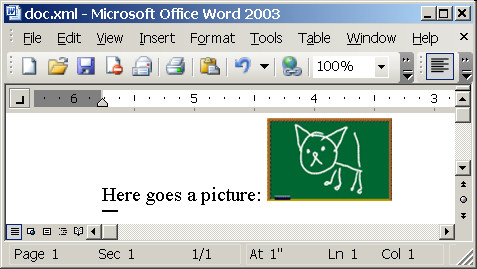
Another tricky part is image size. I found width:100%;height:auto combination to work ok for natural image size.
Still much to explore, but at least some reasonable results.
Hi Oleg,
I'm using the wml2xslt.exe to generate reports in a Java application that I want to move to other platforms than Windows. The obvious problem is wml2xslt.exe only works in Windows. Do you know how to do the same as wml2xslt programatically? I've been looking for that but I didn't find anything.
Thanks in advance and great post!
My word XML file contains two similar pictures,the first picture’s binary information will be stored in the "w:binData" tag as below:
/9j/4AAQ...55O7uddCm6cOVn/9l=
but second picture’s doesn’t contain such binary information instead it is representing in a structure like
here "w:binData" is missing in the second picture.why this difference in the structure even though both pictures are similar.......please help me regarding this.thanks in advance
ShreeMayyu
Hi Oleg,
This is my first post at your site and I am hoping you might be able to help me with an issue I am having with MSXSL.EXE.
My project is to create MS Word document from an XSLT (created using wml2xslt.exe) and an input XML file.
I have success at merging most of the XML elements using MSXSL.exe but I cannot seem to insert "Images".
I have a path in the XML file that refers to an image file on my disk, but it seems that MSXSL does not translate this.
Can you advise what the correct XSLT syntax should be to be able to use images from XML files and XSLT to cerate an MS DOC?
Kind Regards
Mick
Hi Oleg, I have been reading your posts with interest and hope you might be able to help me with what I think should be a simple task for you?
I am learning XSLT and XML and am trying to use the process below to create a MS Word document from XSLT and XML.
The steps I take are as follows:
1. Create an XSD file from a base XML file
2. Link schema to MS word document and create a template using XML tags
3. Use wml2xslt.exe to create an XSLT file
4. Use MSXSL.exe to create the final document.
My main issue is using images. I can merge all my other data fine, but I have no idea on how to insert an image based on a path from an XML element.
You input on this would be greatly appreciated!
Kind Regards
Mick Burian
Hi Oleg,
I tried to implement what you have done with the cat picture, but the generated xml document just ends up with a blank picture holder, and no image. I have checked that my path in is correct. Any ideas?
Hello,
i'd tried to implement this sample in my style sheet to encode the images i need, but i got always the error "The URI my extension does not identify an external Java class".
Do you no what can i do to solve this problem?
Thanks
You probably can find them in the "Office 2003: XML Reference Schemas", at http://www.microsoft.com/downloads/details.aspx?FamilyId=FE118952-3547-420A-A412-00A2662442D9&displaylang=en
Where is the vml.xsd schema? There are other schemas to that is referenced within it, wordnetaux.xsd, xsdlib.xsd, aml.xsd, none of these are included in the download, any idea where can I get them?
Nguyen, send me your sample please. My email is oleg@<this domain.com>
Oleg,
I found that if using the "width:100%;height:auto" it didn't display my image correctly natural size.
Could you please help me a bit with this? Or do you have any ideas?
Thao Nguyen(nguyenthi.ngocthao@gmail.com)
Marisa, this transformation is meant to be run under .NET.
I was not able to open the sample implementation. Microsoft word shows a error message:
"Problems with XSL transform M:\style.xls prevent it from being applied to this XML file."
Details ->>> C# is not a scripting language.
karl, I'm not really familiar with wmz file format. Looks like it's a zipped version - can you link it in HTML?
Rajesh, take a look at http://blogs.msdn.com/brian_jones/archive/2005/07/20/441167.aspx
Hi, I use WordML (starter) and unlike your
<v:imagedata src="wordml://02000001.jpg"
o:title="Image title"/>
my wordML looks have binary image data e.g.
<w:binData w:name="wordml://08000001.wmz">H4sIAAAAAAACC71WPWgUQRR+8+.........../HJl5/AMIeTE2KgsAAA==
</w:binData>
can this be converted by xsl into a proper image for display? - as html & doc output. Thanks.
I want to insert another word document instead of an image, is there any documentation available on how to do that.
Is There a comlete style sheet to convert XSL-FO to WordML completely with images,columns, all features ?
Sorry, no experience of working with VML. Gnerally speaking if you can transform it in C#/VB/whatever - you can plug it into XSLT transformation as extension.
Oleg,
is it possible to convert a VML shapes to WMF/EMF or raster images?
Oleg,
How useable is this now? Is this urn descriptor merely part of some ms implemetation of xml for scripting, or could a user actually generate code to a user space and get results on it?
Sorry if this seems ignorant, I AM ignorant,
Regards.
Ted Doyle,
tjd@s3w.net
Yeah, I've seen it. New download contains full set of schemas, kudos to MSFT.
I see the office schema download was updated on the 5th, and now includes the vml schema.