April 25, 2007
David Carlisle and Jeni Tennison are blogging
David Carlisle and Jeni Tennison are blogging. Skies are falling. Enough said. Subscribed.
April 24, 2007
Finally multitargeting Visual Studio
I installed Microsoft Visual Studio Codename Orcas Beta1 and was really pleased to see that it's finally capable of targeting not only .NET 3.5. It supports .NET versions 2.0, 3.0 and 3.5. This is going to be the first multitargeted Visual Studio version, so far I had to keep Visual Studio .NET for maintaining .NET 1.0 applications, Visual Studio .NET 2003 for .NET 1.1 applications and Visual Studio 2005 for .NET 2.0, what a mess (especially provided that single Eclipse installation works just fine with Java 1.3, Java 2, Java 5 and Java 6). Now that's cool.
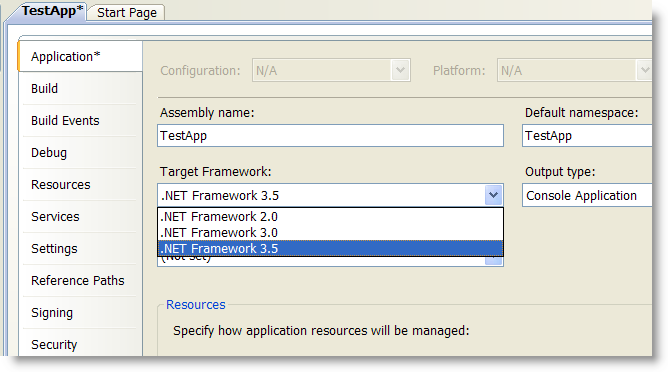
For those interested here are some good info from MSBuild blog: "Multi-Targeting : How does it work?" and "MSBuild, Orcas, and Multi-targeting".
April 18, 2007
HOW TO: Pipeline XSLT Transformations in .NET 2.0 Applications
I mean pre-XProc XSLT pipeline - just when you need to transform an XML document by a sequence of XSLT stylesheets - output from the first transformation goes as input to the second one and so on. This is useful technique helping dramatically simplify your complex multi-stage XSLT stylesheets. Unfortunately there is no simple way to perform such task effectively in .NET 2.0. Here I show you how Mvp.Xml project comes to the rescue.
Note: there is old crappy Microsoft KB article 320847 suggesting pipelining XSLT via byte buffer, Bleh!, don't do this.
The problem is that while the most efficient (fastest, taking less memory) XML store for doing XSLT transformations in .NET 2.0 is still old good XPathDocument (not surprisingly specially designed and optimized for XPath and XSLT), there is no way to take XSLT output directly to XPathDocument. XslCompiledTransform doesn't provide XmlReader over its output. It can do XmWriter, but XPathDocument cannot be loaded via XmlWriter (this is likely to be fixed in post Orcas .NET version).
The problem was solved though. Sergey Dubinets from the Microsoft XML Team contributed his excellent XslReader implementation, which provides an efficient way to read XSLT results as XmlReader. I later wrapped it all into MvpXslTransform class, which extends capabilities of the XslCompiledTransform class by adding support for transforming into XmlReader , vast collection of EXSLT extension functions, multiple outputs and transforming of IXPathNavigable along with XmlResolver.
Here is finally code sample that says it all:
using System;
using System.Xml.Xsl;
using System.Xml.XPath;
using System.Xml;
using Mvp.Xml.Common.Xsl;

class Program
{
    public static void Main()
    {
        MvpXslTransform xslt1 = new MvpXslTransform();
        xslt1.Load("../../XSLTFile1.xslt");
        MvpXslTransform xslt2 = new MvpXslTransform();
        xslt2.Load("../../XSLTFile2.xslt");
        XPathDocument doc = new XPathDocument("../../source.xml");
        XmlReader stage1Output = xslt1.Transform(new XmlInput(doc), null);
        xslt2.Transform(new XmlInput(stage1Output), null,
            new XmlOutput(Console.Out));
    }
}
Simple, fast and memory effective. Get Mvp.Xml library here.
April 12, 2007
Google allows sitemaps to be referenced in robots.txt
So far to let Google know about your sitemap you had to submit it through Google Webmaster tools. Now, according to the Official Google Webmaster Central Blog you can just reference it in your robots.txt file:
Specifying the Sitemap location in your robots.txt file
You can specify the location of the Sitemap using a robots.txt file. To do this, simply add the following line:
Sitemap: <sitemap_location>The <sitemap_location> should be the complete URL to the Sitemap, such as: http://www.example.com/sitemap.xml
This directive is independent of the user-agent line, so it doesn't matter where you place it in your file. If you have a Sitemap index file, you can include the location of just that file. You don't need to list each individual Sitemap listed in the index file.
Now that's much easier.
When Revolution meets Design by Committee: WHATWG proposes W3C to adopt HTML5
As you know W3C woke up recently and restarted HTML activity. WHAT Working Group, who was working independently on HTML5 since 2004 now proposes W3C to adopt HTML5 as starting point and to put their Google guy to be in charge of new W3C HTML 5.
By the way, the need to annotate HTML 5 with "W3C" means there is already a potential confusion. In fact WHATWG is working two specifications: Web Applications 1.0 and Web Forms 2.0, but who knows why they call them both HTML5. Now they are proposing W3C to adopt Web Applications 1.0 and Web Forms 2.0 ("WHATWG HTML5") along with editor as starting point to W3C next HTML version ("W3C HTML").
Anyway, here is the proposition and discussion:
Dear HTML Working Group,

HTML5, comprising the Web Apps 1.0 and Web Forms 2.0 specifications,
is the product of many years of collaborative effort. It specifies
existing HTML4 markup and APIs with much clearer conformance criteria
for both implementations and documents. It specifies many useful
additions, in many cases drawing on features that have existed in
browser-based implementations for a long time. And it actively draws
on feedback from implementors and content authors. Therefore, we the
undersigned propose the following:

- that the W3C HTML Working Group adops the WHAT Working Group's
HTML5 as the starting point for further HTML development
- that the W3C's next-generation HTML specification is officially
named "HTML 5"
- that Ian Hickson is named as editor for the W3C's HTML 5
specification, to preserve continuity with the existing WHATWG effort

If HTML5 is adopted as a starting point, the contents of the document
would still be up for review and revision, but we would start with
the existing text. A suitable next step might be a high-level review
of functionality added and removed relative to HTML4.01, followed by
focused discussion and review of individual topic areas, including
both content already in the spec and proposed new features.
Discussions should be guided by common principles along the lines of
<http://esw.w3.org/topic/HTML/ProposedDesignPrinciples>

If the group is agreeable to these proposals, Apple, Mozilla and
Opera will agree to arrange a non-exclusive copyright assignment to
the W3 Consortium for HTML5 specifications.


L. David Baron, Mozilla Foundation
Lars Erik Bolstad, Opera Software ASA
Brendan Eich, Mozilla Foundation
Dave Hyatt, Apple Inc.
Håkon Wium Lie, Opera Software ASA
Maciej Stachowiak, Apple Inc.
As you can see Mozilla, Opera, Apple and Google (Ian Hickson) are all here. Now W3C HTML WG chairs Chris Wilson (Microsoft) and Dan Connolly (W3C/MIT) have to decide. Interesting. So far seems like people on the public-html mail list like the idea, but personally I don't believe it's gonna happen. I'd like to be wrong though.
And here is another interesting tidbit:
If the HTMLWG adopts the WHATWG spec as a starting point, and asks me to edit the HTML spec, then there will only be one spec. The WHATWG spec and the HTML WG spec would be one and the same.
Ian Hickson
And if not then what? Two different HTML 5 specifications? OMG. Interesting times ahead.
April 11, 2007
Amazon Context Links
Amazon has launched Context Links Beta program. The idea is that you insert a little Amazon script into your pages and when the page is open in a browser the script identifies words and phrases it thinks are relevant and makes them links to whatever Amazon products.

I enabled the script on my blog's frontpage (pinky double underlined links) to see how relevant it is and here are the results:
- "Visual Studio" - Microsoft Visual Studio Standard 2005
- "DocumentSource" - Programming Microsoft ASP.NET 2.0 Core Reference
- "Google AdSense" - The Adsense Code: What Google Never Told You about Making Money with Adsense
- "WHATWG" - Designing with Web Standards (2nd Edition) by Jeffrey Zeldman
- "Community Technology Preview" - Computer Resources for People with Disabilities: A Guide to Assistive Technologies, Tools and Resources f…
- "Google Apps" - "Google Maps Hacks" by Rich Gibson
- "Leumi" - Terror Out of Zion: Irgun Zvai Leumi, Lehi and the Palestine Underground, 1929-1949 by J. Bowyer Bell
- "Google Reader" - Google for Dummies by Brad Hill
- "Fuck Windows" - "Death is a Window by E.C. Blount
- "DreamHost Web" - Internet and World Wide Web Simplified, 3rd Edition by Ruth Maran
- "The Pragmatic Programmer's" - Der Pragmatische Programmierer. by Andrew Hunt
Well, sure there are lots of opportunities for improving relevance, but still not bad at all for beta
April 5, 2007
nXSLTC - an experimental XSLT compiler for .NET 3.5
 So here is nXSLTC.exe v1.0b - an experimental XSLT compiler for .NET 3.5 (Visual Studio "Orcas"). Get it here (free open-source). I probably shouldn't be building this tool, but I have my reasons.
Why not? As a matter of fact, Mike Champion has announced back in February that Microsoft will provide XSLTC.exe tool in the next Visual Studio "Orcas", but apparently it didn't make it into March CTP, at least I didn't manage to find it. It probably will be included into the next drop.
Why yes? First - this is the best way of learning new technology and then - I plan to build something bigger, which Microsoft won't be doing - XSLT project for Visual Studio, so I need this code anyway.
Ok, so nXSLT.exe. It's a command line XSLT compiler for .NET 3.5. It compiles one or more XSLT stylesheets into DLL. These compiled stylesheets can be later used to transform XML documents using XslCompiledTransform class.
The usage is obvious:
nxsltc <source files> [options]
where possible options include:
  /out:<file>            Specifies the output file name.
  /debug[+|-]            Emit debugging information.
  /nowarn                Disable all warnings.
  /namespace:<string>    Specifies namespace for compiled stylesheets.
  /help                  Display this usage message. (Short form: /?)
  /nologo                Do not display compiler copyright banner.
Here is a little sample. Consider this dummy XSLT stylesheet (catalog2html.xslt):
<xsl:stylesheet version="1.0"
 xmlns:xsl="http://www.w3.org/1999/XSL/Transform">
  <xsl:template match="catalog">
    <table>
      <xsl:apply-templates/>
    </table>
  </xsl:template>
  <xsl:template match="book">
    <tr>
      <td>
        <xsl:value-of select="title" />
      </td>
      <td>
        <xsl:value-of select="price" />
      </td>
    </tr>
  </xsl:template>
</xsl:stylesheet>
Let's compile it:
nxsltc.exe catalog2html.xslt /namespace:Foo.Bar /out:stylesheets.dll /debug+
The compilation result is stylesheets.dll, which contains our compiled stylesheet as Foo.Bar.catalog2html class:

How do you run such compiled stylesheet? Easy. XslCompiledTransform class has new overloaded Load() method in .NET 3.5, which accepts Type:
XPathDocument doc = new XPathDocument("books.xml");
XslCompiledTransform xslt = new XslCompiledTransform();
xslt.Load(typeof(Foo.Bar.catalog2html));
xslt.Transform(doc, null, Console.Out);
Above obviously assumes you have added a reference to the stylesheets.dll into your project. Alternatively you can load dll with compiled stylesheets dynamically using Assembly.Load().
I didn't tested performance yet, but it feels like a rocket, very fast. More to come. Get nXSLTC.exe v1.0b here. Enjoy!
PS. And sorry to Microsoft XML Team for spoiling their XSLTC.exe ;)